Guide 2 · Getting started
Market research with Reactor AI
With one click, Reactor scans 200 crypto markets and returns the 5 strongest uptrends and the 5 strongest downtrends.
In this guide you run prompt #1 from the chat, read the result slowly, piece by piece, and at the end take the prompt itself apart. That way you'll see how it's built, and how to change it to look for what you want.
What you need first: a Reactor account you're signed in to (guide 1). You don't need a trading account, because the scan reads market data only and never places orders.
Step 1: The chat screen
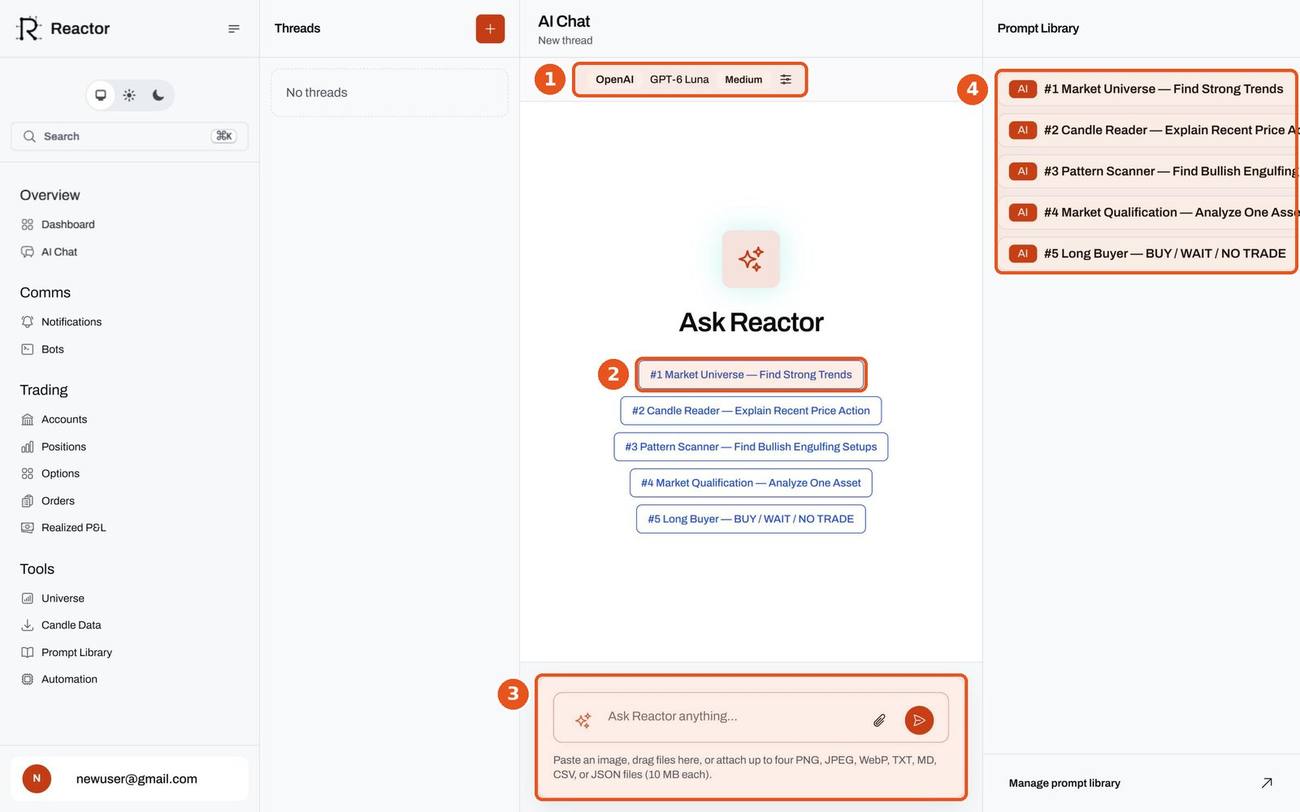
Every user starts with GPT-6 Luna at Medium. This model works very well for every kind of prompt, so you can start right away without changing any settings.
1
Model – the active model: GPT-6 Luna, Medium.
2
Ready-made prompts – five quick starts. This guide uses #1.
3
Message box – a free-form question or file attachments.
4
Prompt Library – your saved prompts.
Step 2: Click prompt #1 and send
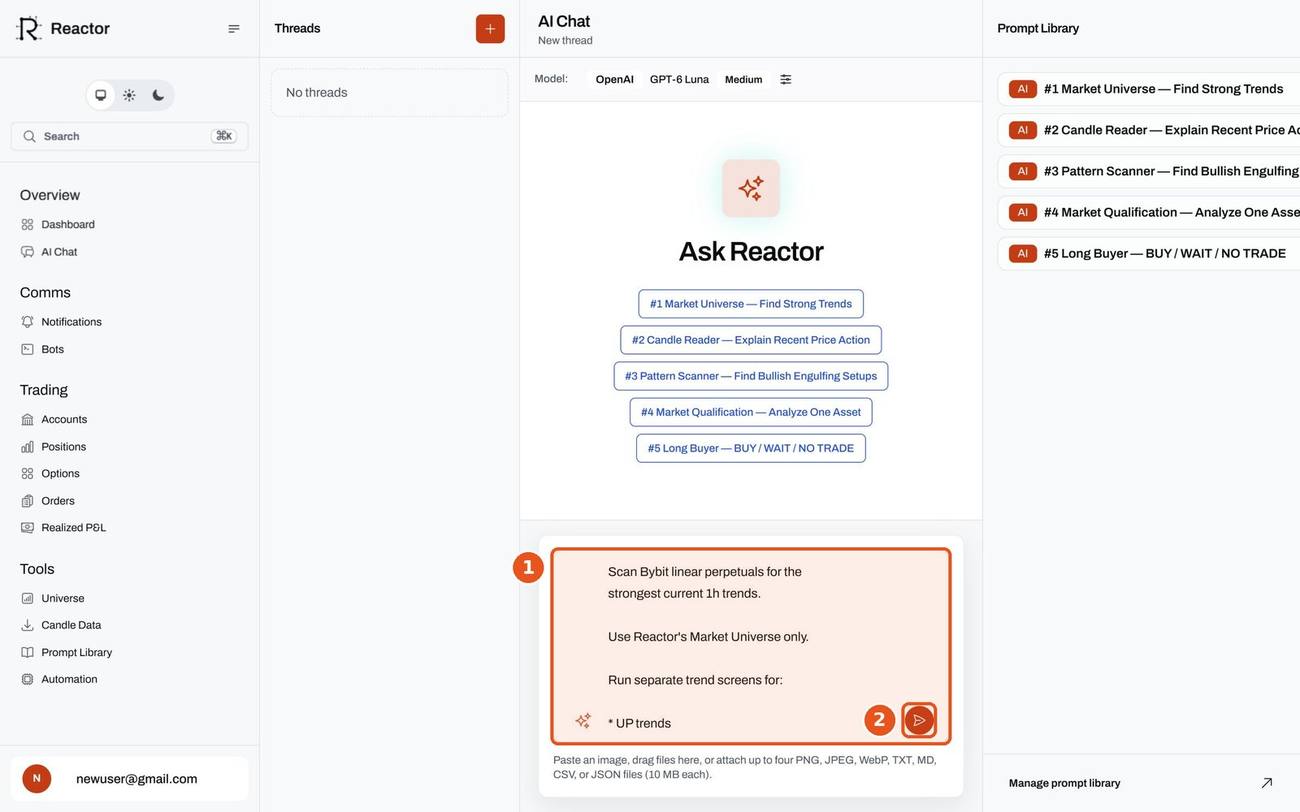
On the chat screen, click #1 Market Universe — Find Strong Trends. The click fills the message box with the full prompt text, but doesn't send it yet.
1
Message box – the full prompt appears here. You can read it and change it before sending.
2
Send – the orange button sends the prompt to Reactor.
Step 3: Reactor at work
After sending, there's nothing to do. Reactor works out on its own which tools to use to get the data, runs them, and returns an organized answer in about 15 seconds.
Step 4: Reading the result
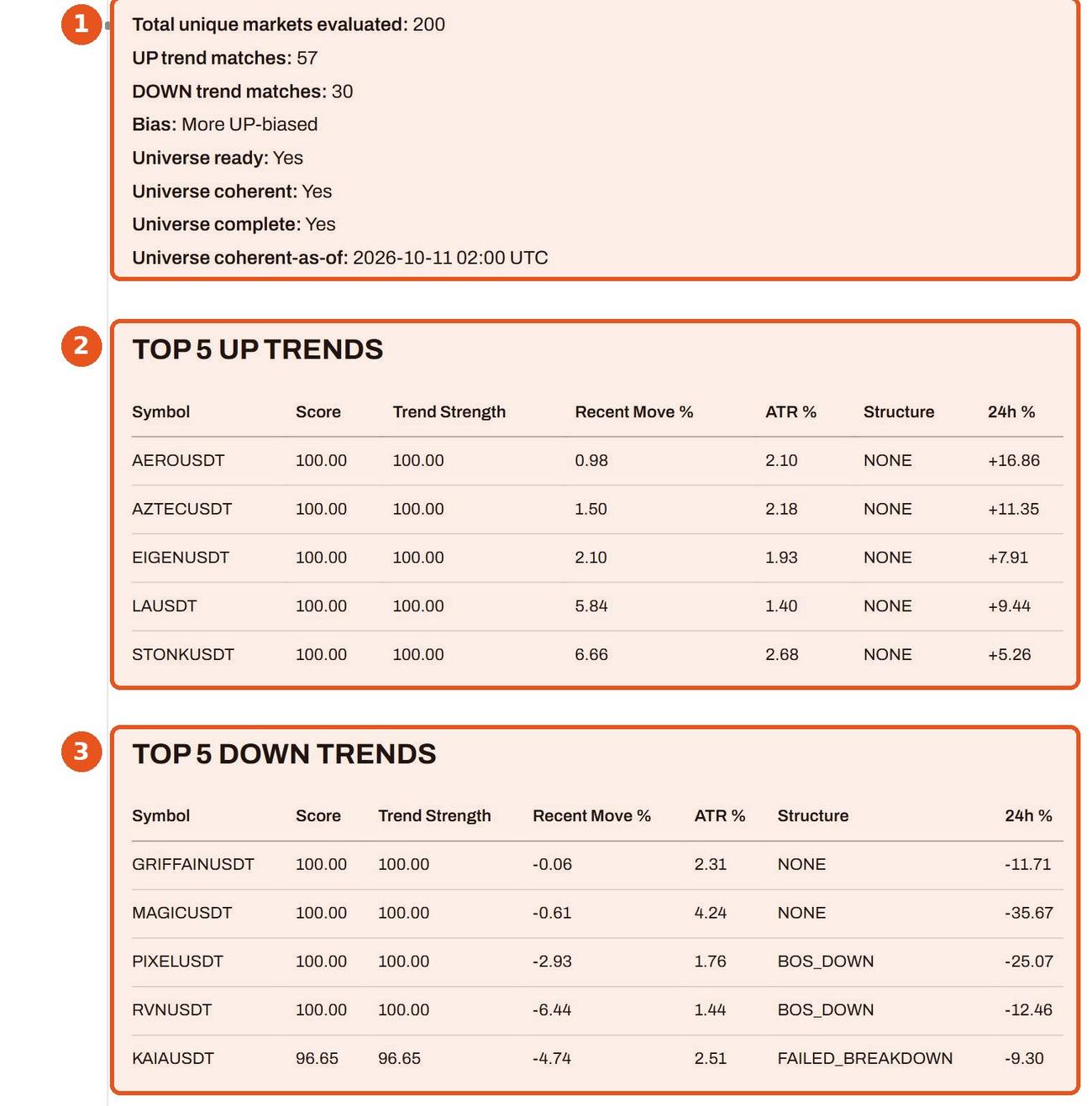
The answer is built exactly the way the prompt asked: a numbers summary, two tables, and at the end an explanation of what Reactor did. In our run, 200 markets were scanned: 57 matched an uptrend and 30 a downtrend.
1
Summary – how many markets were scanned, how many matched each direction, which way the market leans (More UP-biased), and when the data was updated. ready, coherent and complete mean the data is complete and consistent.
2
TOP 5 UP TRENDS – the five strongest uptrends, ranked by Score.
3
TOP 5 DOWN TRENDS – the same fields, for the downside.
What each column in the table shows:
Column
What it shows
Symbol
The asset (a perpetual futures contract on Bybit)
Score
How well it matches the scan, up to 100. Results are ranked by it
Trend Strength
Trend strength on the 1-hour timeframe
Recent Move %
Recent price move, in percent
ATR %
Volatility: average range of movement, in percent
Structure
Market structure detected, for example BOS_DOWN (break of structure down) or FAILED_BREAKDOWN (a breakdown that failed)
24h %
Price change over the last 24 hours
What Reactor did
1
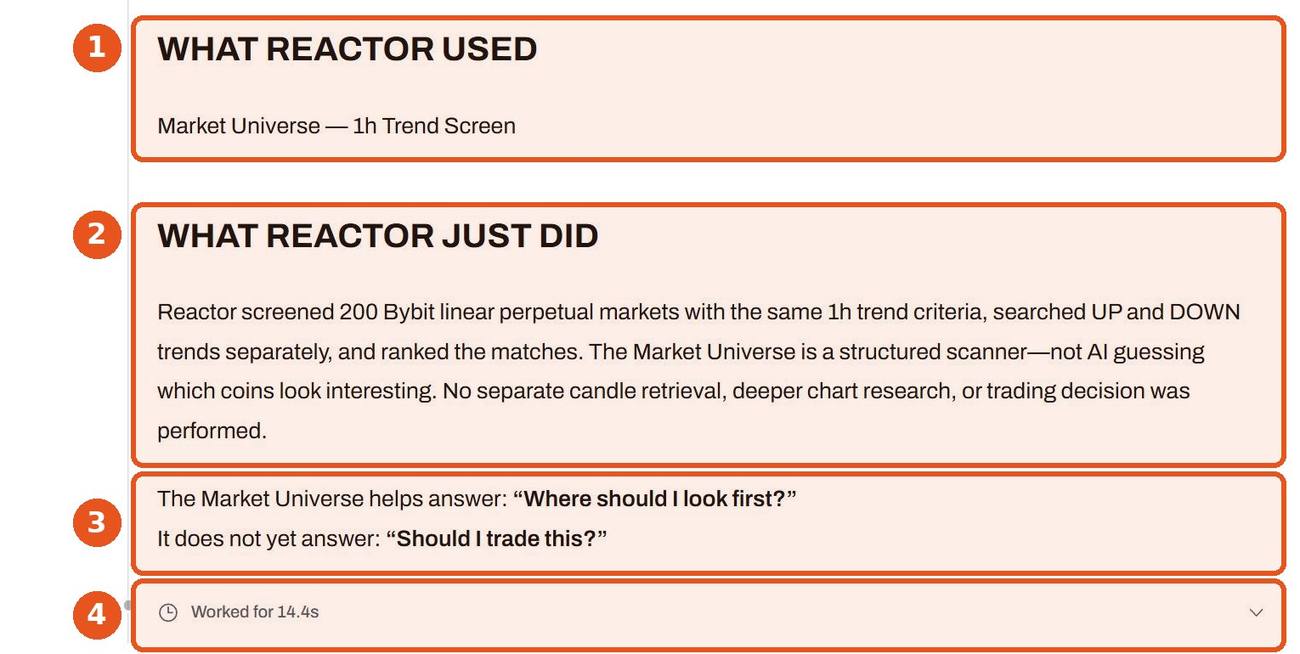
WHAT REACTOR USED – which tool Reactor used: Market Universe — 1h Trend Screen.
2
WHAT REACTOR JUST DID – a plain-language explanation: the same 1-hour trend test was run on 200 markets, up and down separately, and the results were ranked. This is a structured screener, not an AI guessing which coins look interesting.
3
The practical value – the scan answers "where should I look first?", but not yet "should I trade this?". That's the job of prompts #4 and #5.
4
Worked for 14.4s – how long the work took.
The numbers change from run to run, because the scan runs on live market data.
Step 5: The prompt itself
Prompt #1 is a ready-made example for spotting trends in the crypto market. Changing a line or two turns it into a scan of your own. Open it in the Prompt Library.
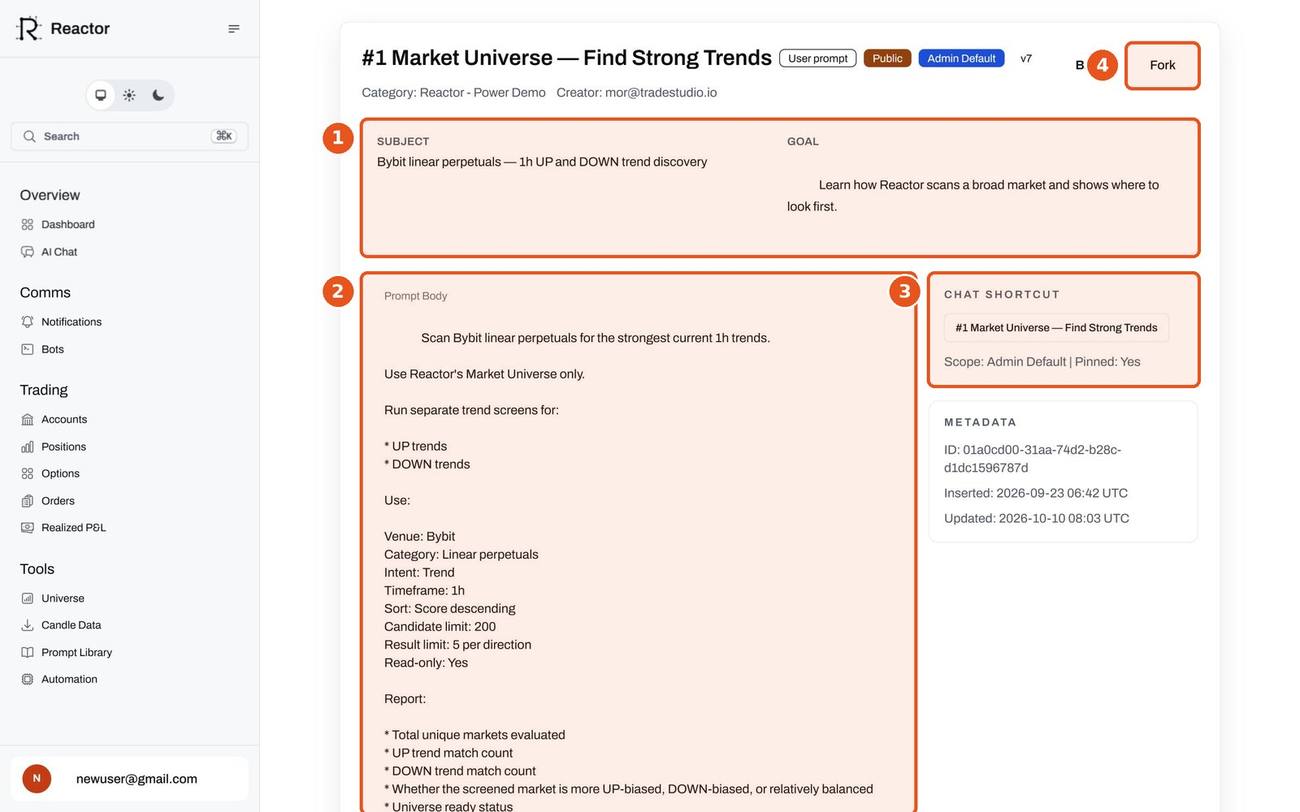
1
Subject / Goal – what the prompt works on and what it aims for.
2
Prompt Body – the full text sent to Reactor.
3
Chat shortcut – the prompt appears as a ready button in the chat.
4
Fork – creates your own copy. You edit the copy without touching the original.
How to adapt the prompt
Every setting in the prompt is written on its own line under Use:. To scan something else, replace the value on the matching line. The rest of the prompt stays exactly as it is.
You want
The line in the prompt
Change it to
4-hour trends instead of 1-hour
Timeframe: 1h
Timeframe: 4h
A different exchange
Venue: Bybit
Venue: MEXC
More results
Result limit: 5 per direction
Result limit: 10 per direction
Scan fewer markets
Candidate limit: 200
Candidate limit: 100
Two ways to change it:
1
For one run – click #1 in the chat, fix the line in the message box and send. The saved prompt doesn't change.
2
For regular use – in the Prompt Library, open #1 and click Fork. Fix the line in the copy and save. The copy stays in your library, and you run it with Run.
How to build a good research prompt
Prompt #1 is built from six parts. The same parts fit any research prompt you write.
Part
Why it matters
How it looks in #1
One goal
A focused question gets a focused answer
Scan Bybit linear perpetuals for the strongest current 1h trends
A defined tool
Reactor doesn't guess which tool to use
Use Reactor's Market Universe only
Explicit parameters
The same result on every run, and easy to change one value
Venue, Category, Timeframe, Sort, Candidate limit, Result limit
A fixed output format
The same fields in the same order, easy to compare runs
Report: … / TOP 5 UP TRENDS … Include only: Symbol, Score…
Boundaries
Keep Reactor from going beyond the prompt's step
Do not retrieve candles. Do not place or prepare an order
An explanation at the end
You see what was done, and can trust the result
WHAT REACTOR USED / WHAT REACTOR JUST DID
The key rule: one step per prompt. Scan first, analyze next, and decide only at the end.
A complete prompt library
Reactor comes with a complete prompt library for research, analysis and structured risk management. On top of that, we teach you how to write any strategy you want, the right and efficient way.
The five ready-made prompts in the chat are built as a path, from a wide scan to a decision:
1
#1 Market Universe – where to look first (this guide).
2
#2 Candle Reader – what one asset's price is doing, in plain language.
3
#3 Pattern Scanner – look for a specific pattern across a whole market.
4
#4 Market Qualification – an in-depth analysis of one asset across several timeframes.
5
#5 Long Buyer – an explicit BUY / WAIT / NO TRADE decision, without placing an order.
Next guide: a range bot for futures.
Next guide
Guide 3: Range bot for futures
From a verified range map — to a trading plan in your own style and risk.